

ONLINE NOTARIZATIONS ARE LEGAL AND ACCEPTED IN ALL 50 STATES

By appointment only. Login to schedule an appointment

E-Notary Services in East Bethel

Notarize Documents Online in East Bethel

If you need a fast, convenient way to get documents notarized, remote online notarization (RON) brings the notary to you over secure live video. Residents of East Bethel can use an Online Notary Service to complete acknowledgments and jurats from home, work, or on the go. Sessions are typically completed in a single video call that includes ID verification, document review, and a tamper-evident electronic seal. This approach reduces travel time, fits into busy schedules, and often allows after-hours appointments so you can finalize urgent documents without waiting for an in-person visit.

Looking Glass Runners offers online notary sessions designed for ease and security, available to people in East Bethel and statewide in Minnesota. Using a device with a camera and microphone, you can upload documents, verify identity with a government ID, and connect on live video with a commissioned notary. After the session the e-notarized file and an audit trail are available for immediate download. Acceptance of out-of-state or online notarizations commonly varies by recipient, so check with whoever will receive the document before you begin to confirm eligibility.

Compare Notary Options

When deciding between in-person, mobile, or remote notarization, consider timing, document type, and location of signers. In-person notarization is appropriate when physical presence with original wet-ink signatures is required. Mobile notaries bring in-person services to your location but require scheduling and travel time. Remote online notarization allows fast access across distances via live video and often supports immediate download of an e-notarized file. Each option has trade-offs, and acceptance by the receiving party commonly determines which method is best for a particular document.

Understanding Remote Online Notarization

Remote online notarization is a process where a commissioned notary uses live audio-video technology to identify signers and notarize documents electronically. The typical session includes uploading the document, verifying identity with a government ID and credential analysis, connecting over secure live video for the notary to witness or administer oaths, and then receiving an e-notarized file with a tamper-evident e-seal. This method creates an auditable digital record and often allows immediate download. While many documents are eligible, acceptance can vary by the receiving organization and by state rules, so confirm eligibility in advance.
It is important to understand how an e-signed document differs from a hand-signed scan. An electronic signature completed within a RON session can be notarized by the commissioned notary during the live video call, and the notary records the event with a digital journal and e-seal. A hand-signed paper that is later scanned and emailed is a different workflow and may not carry the same electronic notarial confirmation. Also note the difference between an acknowledgment, where a signer confirms identity and signature, and a jurat, where a signer swears or affirms under oath in front of the notary.

What Remote Notarization Means

Remote notarization uses secure online tools to let a commissioned notary confirm your identity and notarize documents via live video. The process involves credential analysis of a government ID, a real-time video call so the notary can witness a signature or administer an oath, and issuance of a tamper-evident electronic seal placed on the notarized document. A complete audit trail records the session details, which helps recipients verify the transaction. While many states permit RON, acceptance by banks, courts, and other organizations can vary, so it is wise to confirm recipient requirements before notarizing.

Key Elements of a RON Session

Benefits of Remote Notarization

Remote online notarization offers several practical benefits: convenience, time savings, and broader access for signers who are distant or have mobility constraints. Because sessions are held over live video, multiple signers in separate locations can complete a document together, which simplifies coordination. Appointments are often available outside regular business hours, and the process reduces travel, parking, and waiting. Many users find RON especially helpful for last-minute needs and when immediate access to an e-notarized file is necessary for closing or filing deadlines.
Beyond convenience, RON provides security features that support document integrity. Identity verification tools and recorded video create a traceable record of the notarization event, while a tamper-evident e-seal signals whether a file has been altered. These protections help recipients assess the validity of the notarized document. Still, acceptance varies by recipient and state, so confirming in advance helps avoid surprises. Overall, remote notarization combines practical speed and digital safeguards to make many routine notarial acts simpler.

Quick Notarization in Minutes

Secure ID Check and E-Seal

Security in RON relies on multiple layers: live video observation by a commissioned notary, credential analysis of the government ID, and application of a tamper-evident electronic seal. The session is recorded in a digital journal that notes the authentication method, timestamps, and the notarial act performed. This combination helps create a verifiable record for recipients who need assurance about signer identity and transaction integrity. While these safeguards strengthen confidence in an e-notarized file, recipients’ acceptance policies vary, so it is wise to confirm whether they will accept a RON document.

When In-Person Notarization Is Needed

Wet Ink or Originals Needed

Certain transactions and recipients request original wet-ink signatures or need physical documents, which makes an in-person or mobile notary the appropriate choice. For example, some deed recordings, court filings, or documents that will be physically stored may require the original paper with a handwritten signature and a notary’s physical stamp. If the receiving party specifies an original, a remote electronic seal may not satisfy their requirements. Always check with the recipient to learn whether a wet-ink original is necessary before scheduling a RON session.

Document or State Exclusions

Not all documents or jurisdictions allow remote notarization. A few document types and certain state rules may exclude RON for particular transactions, so it is important to confirm eligibility ahead of time. Examples might include some probate paperwork, certain court orders, or other documents specifically barred by state law or a receiving institution. Acceptance of online notarizations varies, so contact the organization that will receive the notarized file to verify whether a RON document will be accepted before proceeding with an online session.

When Online Notarization Works Best

Speed, Remote Access, After-Hours

Remote notarization shines when speed and flexibility matter. Many RON sessions can be completed in about five to fifteen minutes once you have your document and ID ready, making it an efficient choice for busy schedules. It also enables signers in different locations to sign together without traveling, and many services offer evening or weekend appointments to fit nontraditional hours. For East Bethel residents, RON reduces the need to travel to an office, saving time and allowing immediate action when documents are time-sensitive.

Immediate Download and Audit Trail

After a RON session the finalized e-notarized document and its audit trail are typically available for immediate download. The audit trail includes session timestamps, ID verification details, and a record of the notarial act, which can help recipients validate the transaction. Immediate access to the notarized file is helpful when documents must be submitted quickly to lenders, title companies, or other organizations. While this speed is a major advantage, always confirm acceptance of electronic files with the receiving party before relying solely on a RON format.

online notary service

Practice Areas

Top Searched Keywords

Why Consider Our RON Service

Consider remote online notarization when you need a fast, authorized notarial act without leaving home. RON helps people who have limited mobility, tight schedules, or participants in different locations complete notarizations together. The process reduces transit time and usually provides faster access to the notarized document through immediate download. For East Bethel residents who want to avoid travel or coordinate signers across distances, RON can be a practical alternative that balances speed and recordkeeping while maintaining the formal notarial steps required by statute.

You might also choose RON when security and auditability matter. The combination of live-video verification, credential analysis, and a tamper-evident electronic seal creates a documented notarial event that recipients can review. This approach frequently meets the needs of lenders, title companies, and other organizations that accept electronic notarizations. Because acceptance policies vary by recipient and state regulations, confirm in advance whether they will accept a remote notarization. Our service can help explain the RON workflow and what recipients commonly expect to see in an e-notarized file.

Common Situations for RON

People often use remote online notarization for real estate closings, loan signings, powers of attorney, affidavits, and business documents when speed and convenience are priorities. RON is also helpful for signers who are traveling, living abroad, or separated by distance from other required signers. For urgent filings or transactions with tight deadlines, immediate access to an e-notarized file can be essential. Remember that acceptance of RON varies by recipient and document type, so check eligibility before scheduling your session to ensure the notarized document will be accepted.

Real Estate Closings

Remote notarization is commonly used in real estate transactions for documents that lenders, title companies, or escrow services will accept electronically. When permitted, RON allows buyers, sellers, and other signers to complete their parts from different locations and still receive a secured e-notarized package. Because rules about real estate documents and RON can differ by state and by the lender or title company, confirm acceptance before scheduling. If an original wet-ink signature is required, you may need to arrange an in-person or mobile notary instead.

Loan and Financial Documents

Many financial institutions accept electronically notarized documents for routine loan and account transactions, which makes RON a useful option for borrowers and account holders. The recorded audit trail and identity verification steps help lenders assess the validity of the notarization. However, policies vary between institutions, and certain loan types or closing processes may still require in-person signatures. Check with your lender or financial institution about their acceptance criteria for remote notarizations before you proceed with an online session.

Powers of Attorney and Affidavits

Powers of attorney and affidavits are common uses for both acknowledgments and jurats in remote sessions. A power of attorney often requires an acknowledgment that the signature is voluntary, while an affidavit typically requires a jurat where the signer swears the truth of statements under oath. RON can accommodate both acts when allowed by law and accepted by the receiving party. Given jurisdictional differences and recipient preferences, confirming acceptance in advance helps ensure your notarized document will be usable for its intended purpose.

Online Notary FAQs

What is remote online notarization (RON)?

Remote online notarization (RON) is a method where a commissioned notary verifies a signer’s identity and notarizes a document using live audio-video technology. The signer uploads the document, confirms identity with a government-issued photo ID and credential analysis, connects with the notary over secure video, and signs or swears as required. The notary then applies a tamper-evident electronic seal and records the session in an audit trail. This creates a verifiable electronic notarial act that many recipients can accept. RON sessions are designed for convenience and auditability. After the notary completes the session, you typically receive the e-notarized file immediately for download, along with session metadata that documents the identity checks and timestamps. While RON is accepted in many contexts, acceptance varies by recipient and jurisdiction, so verify with the organization receiving the document before you begin.

Many common documents—such as acknowledgments for deeds, powers of attorney, affidavits, and some loan documents—can often be notarized via remote online notarization when allowed by law and accepted by the recipient. The two main types of notarial acts in RON are the acknowledgment, where a signer confirms the signature was made willingly, and the jurat, where a signer swears or affirms the truth of a written statement. Acceptance depends on both state law and the receiving party’s policies. Some document types and jurisdictions exclude online notarization, and certain organizations may require a physical wet-ink original. Because acceptance can vary, check with the recipient—such as a bank, title company, or court—before arranging a RON session so you know whether an electronic notarization will meet their requirements.

To prepare for an online notary session, gather a current government-issued photo ID such as a state driver’s license, state ID card, or U.S. passport and ensure it is legible. Choose a quiet, well-lit room and position your camera so the notary can clearly see you and your ID. Have your documents ready in the format requested by the platform and close other applications that might use bandwidth to improve connection stability. Also confirm the recipient accepts remote notarization and check whether the document requires a specific notarial act, such as an acknowledgment or jurat. If additional signers are involved, coordinate with them about timing and make sure each signer has an appropriate device with camera and microphone access for the live video session.

A scanned hand-signed document and an e-notarized file are not the same. A scanned document is a digital image of a paper document that was signed in person; it does not include the electronic notary seal or the digital audit trail generated by a RON session. An e-notarized file produced after a remote session includes the notary’s electronic seal, timestamps, and accompanying audit data that evidence the identity verification and notarial act. Recipients often treat these formats differently. Some organizations accept scanned originals, while others require the verifiable audit trail and e-seal that come with RON. Because acceptance policies vary, check with the recipient to determine which type of notarized document they will accept for your transaction.

Banks, title companies, and other institutions commonly accept remote online notarizations, but acceptance varies by organization and by the type of document. Lenders and title companies that have updated processes for electronic closings may readily accept a RON document, especially when it includes a tamper-evident e-seal and a clear audit trail. However, some institutions still prefer or require wet-ink originals or have internal rules that limit acceptance of electronic notarizations. Before scheduling a RON session, contact the bank, title company, or recipient to confirm their acceptance policy. Verifying acceptance in advance helps avoid delays and ensures that the notarized document will be usable for its intended purpose.

Accepted IDs for remote online notarization usually include current government-issued photo identification such as state driver’s licenses, state ID cards, and U.S. passports. The notary will review the ID via the camera and may use credential analysis tools that scan and validate ID details. Some platforms may accept other forms of identification depending on the jurisdiction and the identity-proofing requirements in place. Because states and platforms may have different rules about acceptable identification and the need for additional verification, review the platform’s ID instructions before your session. If you have questions about whether a specific ID will be accepted, contact the service in advance to confirm acceptable forms of identification.

Most remote online notarization sessions are completed quickly once you are ready, often within five to fifteen minutes for routine documents. Time varies depending on how prepared you are, whether additional identity proofing is required, and how many signers are involved. Complex signings or documents requiring multiple notarizations may take longer, so plan accordingly and allow extra time if the transaction is complicated. To keep your session efficient, have your ID and documents ready, ensure a stable internet connection, and follow the platform’s submission steps. If multiple signers are participating from different locations, coordinate the timing to avoid delays and make the process smoother for everyone.

Yes. One of the advantages of remote online notarization is that multiple signers can join the same session from different locations. The notary coordinates the live video call so each signer can be identified and can sign or swear as required while the notary observes. This capability reduces travel needs and helps parties in different cities or states complete a notarial act together. When coordinating multiple signers, communicate clearly about timing and device requirements. Each signer should have a working camera and microphone, a valid form of ID, and confirmation that the receiving party accepts remote notarization for the document in question. Good coordination helps the session proceed smoothly and avoids rescheduling.

Security and privacy are central to remote online notarization platforms. They typically use encrypted connections for live video, secure document uploads, identity credential analysis tools, and an electronic sealing process that shows if a file has been altered after notarization. The session is also recorded in an audit trail that documents the identity verification and notarial act, which supports trust in the digital record. While these protections reduce risk, no system is entirely immune to threats. Use a private network when possible, avoid public Wi-Fi, and ensure your device’s software is up to date. If you have concerns about data handling, ask the provider about their security practices and data retention policies before beginning the session.

If your document is not eligible for remote notarization because of state law or recipient requirements, you will need to use an in-person or mobile notary that can provide a wet-ink signature and a physical stamp. Some court filings, certain estate documents, or transactions identified by the receiving party may fall into this category. Confirming eligibility with the recipient before attempting a RON session prevents wasted time and ensures you select the correct notarization method. When a document is ineligible for RON, consider scheduling a mobile notary who can travel to your location, or visit a local notary office. If you need help determining eligibility, contact the recipient or our service team to discuss alternatives and find a suitable path to complete the notarization.

Nationwide • Online Notary

Online Notary in Minutes

Upload your document, verify your ID, and meet a commissioned notary on live video. Download your notarized file right away.

5–15 min
Typical session time
$15–$20
Per stamp • see pricing
50 States
Out‑of‑state notarizations accepted

Why Choose Looking Glass Runners

Fast, affordable, and flexible—built for modern life. We accept all file types and support both eSign and hand-signed scans.

Speed

Most notarizations complete in 5–15 minutes.

Availability

On‑demand, after‑hours, and weekends.

Affordability

Transparent pricing from $15 per stamp.

Nationwide

States recognize and accept out‑of‑state notarizations.

Security

Live video identity checks + tamper‑evident e‑seal.

Convenience

No travel or printing required—eSign supported.

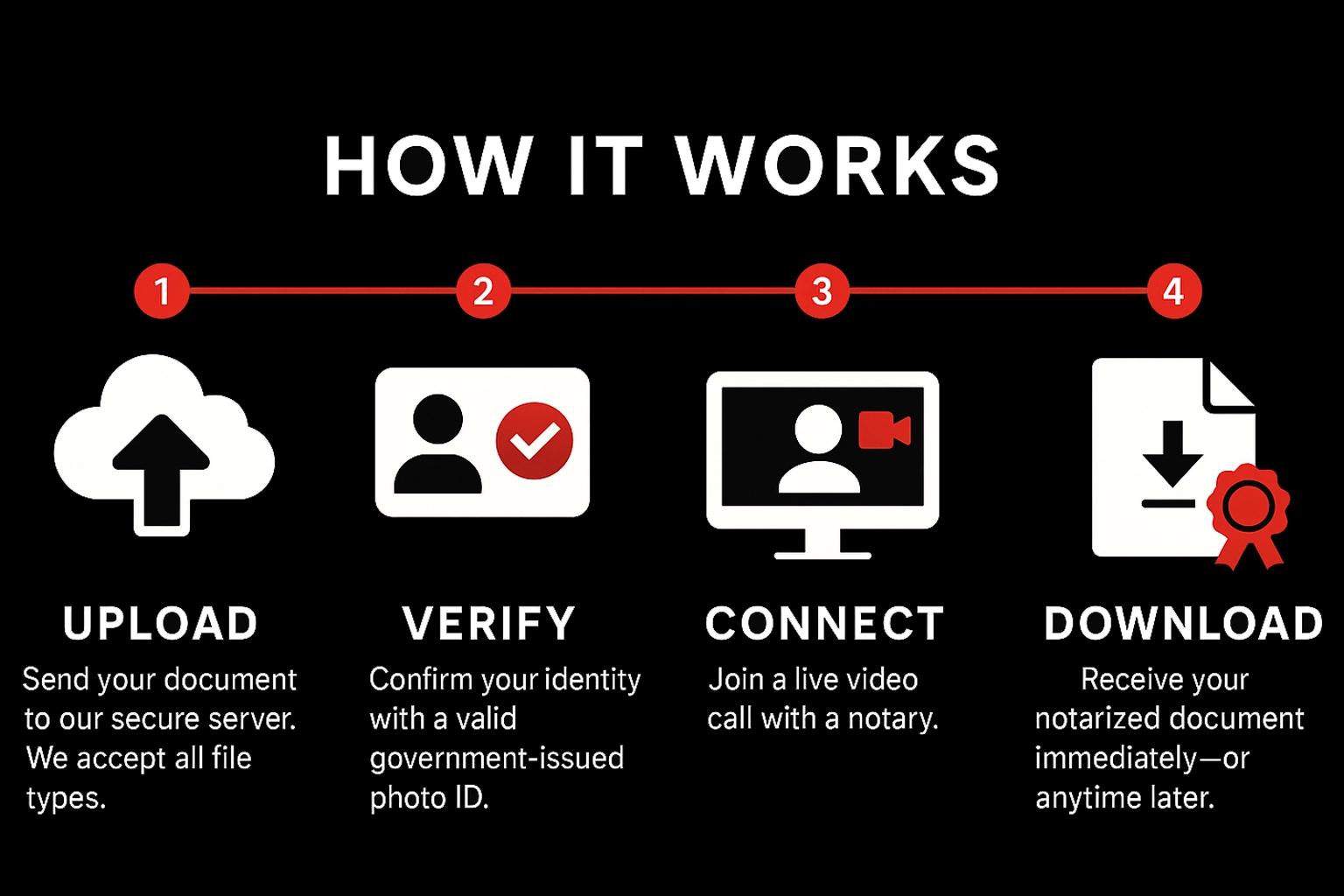
How It Works

Upload

Send your document to our secure server. We accept all file types.

Verify

Confirm your identity with a valid government‑issued photo ID.

Connect

Join a live video call with a notary.

Download

Receive your notarized document immediately—or anytime later.

Pricing & Payment

Standard

$15
Per stamp • Mon–Fri before 5:00 PM EST

After‑Hours / Weekend

$20
Per stamp • Weekdays after 5:00 PM EST & all day Sat/Sun

Payment

Pay during the meeting via Credit Card, Debit Card, Zelle, Cash App, or Venmo. Notarization completes after payment is received.

What You Need

Requirements

  • Stable internet connection
  • Device with camera, microphone, and sound
  • Ability to appear on a live audio‑video call

Accepted IDs (examples)

  • U.S. state‑issued driver’s license or photo ID
  • U.S. passport (book or card)
  • Certificate of U.S. Citizenship / Naturalization
  • Foreign passport
  • Alien Registration Card (with photo)
  • Military ID

Not a complete list. Unsure? Email hello@lookingglassrunners.com.

Ready to notarize?

Have your document signed and notarized within minutes. Getting a document notarized has never been easier.

Notarize now — fast, secure & nationwide Start

Notary Services in East Bethel

Professional online and mobile notary services available 24/7