

ONLINE NOTARIZATIONS ARE LEGAL AND ACCEPTED IN ALL 50 STATES

By appointment only. Login to schedule an appointment

Online Notary Services in Cedar Grove County, United States

Notarize Documents Online in Cedar Grove

Looking Glass Runners makes remote online notarization easy for residents of Cedar Grove in Essex County and for customers across the state. With a secure live video session, a commissioned notary verifies your identity, witnesses your signature or notarizes your electronic signature, and applies a tamper-evident e-seal to your document. This service is designed for speed and convenience, letting you finish notarizations from home, work, or anywhere with a camera and stable internet. Availability often includes evenings and weekends, and once the session ends you can usually download your notarized file immediately for safe keeping or sharing.

Remote online notarization commonly works for many personal and business documents, but acceptance can vary by the receiving party and by state rules. During the session you’ll use a device with a camera and microphone, present a government-issued ID, and follow a short identity verification process. We do not give legal advice, but our platform focuses on secure identity checks, live video, and a recorded audit trail so recipients can verify the notary’s actions. If a document requires original wet-ink signatures or is excluded by state law, we’ll let you know and suggest next steps for completion.

Compare Notary Methods

Choosing between in-person, mobile, and remote online notarization depends on document needs, urgency, and acceptance. In-person notarization is traditional and widely accepted for originals and some restricted documents. Mobile notaries travel to you and handle wet-ink requirements on site. Remote online notarization offers speed and convenience when the receiving party accepts e-notarized documents and state rules allow RON. Before you begin, check whether the document requires original signatures, physical witnesses, or falls under exclusions. Our service helps identify RON-compatible documents and guides you to the right option for your situation.

Understanding Remote Online Notarization

Remote online notarization uses live video, identity validation, and secure electronic seals to notarize documents without an in-person meeting. The process typically starts when you upload your document, confirm the type of notarization needed, and schedule or join a live session with a commissioned notary. During the session the notary visually confirms your identity, watches you sign if required, and attaches an electronic notarial certificate and tamper-evident e-seal. A recorded audit trail and downloadable notarized file are created at the end. Acceptance of RON documents depends on the receiving party and applicable state rules, so check requirements in advance.
Different notarization types exist. An acknowledgment has the signer state they voluntarily signed the document, while a jurat requires signing under oath and a verbal affirmation. Electronic signatures and hand-signed scans are distinct: eSign allows signing within the digital session, whereas a hand-signed scan is a traditional signature captured as an image. Our process clarifies which method the recipient accepts. Not all documents can be notarized online in every state, and certain records or transactions may still need wet-ink signatures or in-person notarization. We help identify eligibility before you begin your session.

What Remote Notarization Means

Remote online notarization is the electronic process where a commissioned notary uses live audiovisual technology to verify identity and notarize a document without being in the same physical location. The notary confirms identity through government-issued IDs and identity proofing tools, witnesses the signature via real-time video, then attaches an electronic certificate and a tamper-evident e-seal. The session is recorded, creating an audit trail. This method speeds up transactions and is especially useful when parties are in different places, but specific acceptance rules and document eligibility may vary by state and by the organization receiving the document.

Key Elements of a Remote Session

Benefits of Remote Notarization

Remote online notarization provides convenience by removing the need to travel to a notary office, saving time and often offering more flexible appointment times. It supports signers in different places, allowing multi-party sessions without coordinating physical locations. Security features like live video ID checks, recorded sessions, and tamper-evident e-seals protect the integrity of the notarization. For Cedar Grove residents, this means completing important documents from home or work and receiving a downloadable file immediately after the session. Always verify recipient acceptance and document eligibility before starting.
Another benefit is clarity: the platform records identity checks and the notarial act, creating an audit trail that recipients can reference if they need to confirm the process. Remote notarization also reduces logistical hurdles for out-of-state signers and can speed real estate closings, financial transactions, and other time-sensitive paperwork when the receiving party accepts RON. While many organizations accept e-notarized documents, requirements vary, so confirm with the recipient and we will help determine the best notarization path for your document.

Fast Sessions in Minutes

Secure ID Checks and E-Seals

Security in remote notarization combines live visual ID checks, identity-proofing technology, and a tamper-evident e-seal that shows when the notary applied their electronic certificate. The session is recorded and stored as an audit trail to document the notary’s verification steps and the signing. These controls help recipients verify the authenticity of an e-notarized document, and they reduce fraud risk compared with unauthenticated electronic signatures. Acceptance depends on state rules and recipient policies, so confirm requirements ahead of time to ensure the notarized document will be accepted.

When In-Person Notarization Is Needed

Wet-Ink and Original Requirements

Some documents and organizations still require original wet-ink signatures or physical notarizations, such as certain court filings, transactions involving original paper deeds, or documents specified by state or institutional rules. If a receiving party explicitly states that an original must be presented or that a wet-ink signature is necessary, remote notarization may not meet that requirement. In those cases, a mobile notary or an in-person meeting is appropriate. We help check these requirements in advance so you can choose the correct notarization method and avoid delays when submitting your documents.

Document or State Exclusions

Not all states authorize remote notarization for every document type, and some documents—like certain wills or court-specific forms—may be excluded from RON by state law or by the receiving entity. Additionally, a recipient such as a government agency, lender, or foreign authority may not accept e-notarized files. When a document or recipient excludes online notarization, you will need to use an in-person or mobile notary as required. We advise confirming acceptance before your session so you know whether RON is suitable for your documents.

When to Use Online Notarization

Fast Notarization Across Locations

Remote notarization is ideal when speed and geographic flexibility matter. If signers are in different cities or need a notarization outside normal business hours, a live video session can be scheduled quickly without travel. This is especially helpful for people in Cedar Grove who need to coordinate with others located elsewhere or who prefer evening appointments. The session typically completes in a short time, letting you avoid delays caused by commuting or limited local office hours. Always confirm the receiving party accepts online notarization before relying on RON for urgent submissions.

Immediate Download and Audit Trail

One major benefit of remote notarization is getting an immediately downloadable, e-notarized file with a recorded audit trail. After the session, you can save, print, or share the notarized document, and the recorded session provides evidence of identity verification and the notary’s actions. This traceability is helpful when the recipient wants proof of how and when the notarization occurred. The secure e-seal and recorded metadata add confidence that the document was handled properly, but recipients’ acceptance policies vary so it’s wise to check ahead of time.

online notary service

Practice Areas

Top Searched Keywords

Why Use Our Online Notary Service

Consider remote notarization when you need speed, convenience, or flexibility. Our platform supports Cedar Grove residents who want to avoid travel, coordinate signers in different places, or hold sessions outside conventional business hours. The process creates a recorded audit trail, supports identity verification, and delivers an e-notarized file you can download immediately after the session. While RON is convenient in many cases, always verify with the receiving party and confirm that your document type is eligible under current state rules so you use the correct notarization method.

Another reason to consider RON is reduced logistical complexity—no need to arrange transportation or in-person meetings, especially when coordinating multiple signers. For time-sensitive transactions, remote notarization can shorten closing times and remove geographic barriers. We help customers check document eligibility and recipient acceptance to ensure your notarization fulfills requirements. If a document must be notarized in person or needs wet-ink signatures, we will advise on alternatives and next steps so you can complete your transaction efficiently.

Common Reasons to Use RON

People often choose remote notarization for real estate documents, mortgage closings, powers of attorney, affidavits, and business agreements when the recipient accepts electronic notarizations. It’s also used when signers are separated by distance, need after-hours appointments, or want an immediate downloadable notarized file. However, acceptance rules vary by receiving party and state, so confirm eligibility before starting. For Cedar Grove residents, RON can save trips to a notary and allow quick handling of documents that must be completed promptly, while preserving an audit trail for verification.

Real Estate and Closings

Remote notarization is often used in real estate transactions when lenders and title companies accept e-notarized documents. It helps close deals faster by allowing signers, agents, and lenders to coordinate without meeting physically. Some closings still require wet-ink originals or special handling, so always check with your title company or lender first. If electronic notarization is accepted, the recorded session and e-seal provide an audit trail that can be used to confirm how and when signatures were taken, which can streamline closing timelines and reduce the need for in-person meetings.

Business Agreements and Contracts

Businesses use remote notarization to sign contracts, corporate documents, and authorizations when the receiving party accepts electronic notarizations. This saves time for distributed teams and speeds contract execution. Make sure the contract language and the recipient allow RON, and specify whether an acknowledgment or jurat is required. When properly completed, an e-notarized document includes a notarial certificate and e-seal, plus an audit trail. If a party requires a wet-ink signature or a physical original, arrange an in-person or mobile notarization as needed.

Affidavits and Sworn Statements

Affidavits and sworn statements that require a jurat can often be completed through remote notarization when state rules permit the administration of oaths online. During the session the notary administers the oath or affirmation and confirms the signer’s identity, then records the jurat in the notarial certificate. Since jurats involve an oath, ensure the receiving party accepts an electronic jurat and that you follow required procedures. If the recipient requires a physical jurat or has other restrictions, arrange an in-person notarization as appropriate.

Remote Notary FAQs

What documents can be notarized online?

Many common documents are eligible for remote online notarization when state rules and the receiving party allow it. This includes documents like powers of attorney, real estate forms, business contracts, affidavits, and acknowledgments for many transactions. However, some documents may be excluded by state law or by the recipient’s policies. Before your session, confirm with the organization receiving the document whether they accept e-notarized files and whether the document type is eligible for RON. If a document is excluded or the recipient requires a wet-ink original, you will need an in-person or mobile notary instead. We can help check eligibility and advise on the best approach so you don’t proceed with RON when it won’t be accepted. Confirming acceptance ahead of time reduces the risk of needing a second notarization or delaying your transaction.

Identity verification in a remote session typically requires a current government-issued photo ID such as a state driver’s license, state ID card, or U.S. passport. The notary will compare the person on camera to the ID and may use credential analysis or knowledge-based authentication tools to confirm identity. Requirements vary by state, and the platform may ask you to complete identity-proofing steps before the live session begins. Good lighting, a clear camera view of your ID, and a stable internet connection speed up verification. If your ID is expired or damaged, the notary may not be able to complete the session. Check accepted ID types in advance and contact us if you anticipate any issues so we can guide you through alternatives.

An e-notarized document is commonly accepted when the receiving party and the relevant jurisdiction permit remote notarization. The notary applies an electronic notarial certificate and a tamper-evident e-seal, and the session is recorded to create an audit trail. These elements help recipients verify the notarization. Acceptance varies across states and organizations, so check with the recipient before starting a session to confirm they accept RON. Because rules and policies differ, if a recipient does not accept RON you may need to obtain a traditional wet-ink notarization. We can help confirm recipient requirements and suggest next steps if electronic notarization is not acceptable for your document.

Most remote notarization sessions take a short time, often between five and twenty minutes depending on document complexity and identity verification requirements. Simple acknowledgments with a single signer are typically faster, while multi-signer sessions or jurats may take longer. Preparing your ID and documents in advance helps keep the session efficient and reduces interruptions. Scheduling flexibility often includes evenings and weekends, which can speed completion compared with waiting for in-person availability. After the session, you usually receive an immediately downloadable notarized file and a recorded audit trail. Timeframes can vary, so allow extra time for complex documents or additional verification steps.

You need a device with a working camera and microphone—this can be a laptop, tablet, or smartphone—and a reliable internet connection. A modern browser or the platform’s app is typically required. Good lighting and a quiet space help the notary clearly see your ID and witness signatures. Make sure your device’s camera frames your face and ID during the verification step. Stable Wi-Fi is preferred over weak mobile data to reduce the chance of dropped calls. Close other apps or browser tabs that might slow your device. If you’re unsure whether your device will work, contact our support before your session so we can confirm compatibility and help you prepare.

Yes, multiple signers can often join a single remote session as long as the platform and the notary’s jurisdiction allow multi-party notarizations. Each signer must have their own device, camera, and accepted ID for identity verification, and the notary will verify each person on camera. Scheduling coordination helps ensure all signers are present at the same time to complete the document together. If signers are in different states, acceptance and eligibility can depend on state rules and the document’s requirements. We can help determine whether a joint remote session is appropriate for your situation and advise on any jurisdictional issues to watch for before you schedule.

If your recipient will not accept a remotely notarized document, you may need to obtain an in-person or mobile notary who can handle wet-ink signatures or other special requirements. Always confirm acceptance before starting a remote session to avoid extra work. If a recipient has specific notarization language or witness requirements, we can review those needs and recommend the proper notarization method. When encountering refusal, ask the recipient to specify the exact reason—some refusals are based on internal policy rather than law. In cases where RON is valid but not accepted by a particular organization, consider alternatives like mailing an original after an in-person notarization or discussing options with the recipient.

Yes. A jurat involves the signer swearing or affirming the truth of the document’s statements and usually requires signing in the notary’s presence under oath. An acknowledgment is the signer stating they willingly signed the document, without an oath. In remote sessions the notary administers a jurat by asking the signer to swear or affirm on camera and records that act, while an acknowledgment has the signer state their voluntary signature on camera. Which one you need depends on the document and the recipient’s requirements. Jurats are common for affidavits and sworn statements, while acknowledgments are common for deeds and powers. Confirm the correct notarial act before the session so the notary applies the right certificate.

A hand-signed scan is a photograph or scan of a wet-ink signature and may be used in some workflows, but it is different from an electronic signature applied within a remote notarization platform. An eSign used in RON is typically captured within the platform while the notary observes and records the act, enabling the notary to attach an e-seal and create an audit trail that demonstrates the signing event occurred under verification. Some recipients accept hand-signed scans notarized in person, while others prefer an e-notarized document with a recorded session and e-seal. Check recipient preferences before your session. If a hand-signed original is required, an in-person notarization or mobile notary may be necessary.

Privacy and data protection are central to our process. Sessions are conducted over secure, encrypted video connections, and identity verification tools comply with applicable standards. The recorded session and audit trail are stored securely and shared only as needed for verification with you and, if required, the receiving party. We follow best practices for protecting personal information and limit access to authorized personnel and systems. Still, you should avoid sharing unnecessary sensitive details during the session and confirm who will receive the notarized file. If you have privacy concerns or need special handling for confidential documents, contact our support before your appointment and we will explain available safeguards and data retention practices.

Nationwide • Online Notary

Online Notary in Minutes

Upload your document, verify your ID, and meet a commissioned notary on live video. Download your notarized file right away.

5–15 min
Typical session time
$15–$20
Per stamp • see pricing
50 States
Out‑of‑state notarizations accepted

Why Choose Looking Glass Runners

Fast, affordable, and flexible—built for modern life. We accept all file types and support both eSign and hand-signed scans.

Speed

Most notarizations complete in 5–15 minutes.

Availability

On‑demand, after‑hours, and weekends.

Affordability

Transparent pricing from $15 per stamp.

Nationwide

States recognize and accept out‑of‑state notarizations.

Security

Live video identity checks + tamper‑evident e‑seal.

Convenience

No travel or printing required—eSign supported.

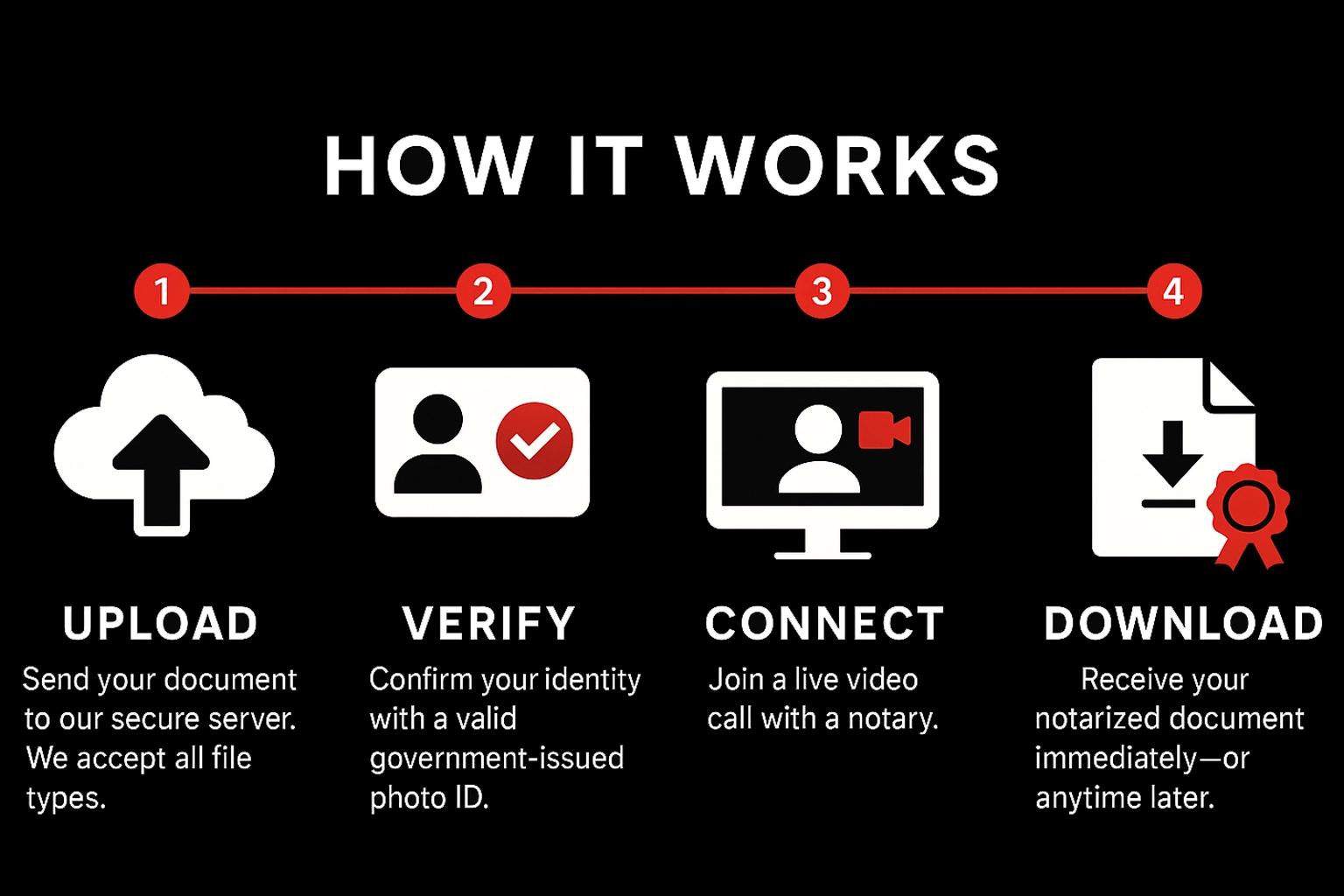
How It Works

Upload

Send your document to our secure server. We accept all file types.

Verify

Confirm your identity with a valid government‑issued photo ID.

Connect

Join a live video call with a notary.

Download

Receive your notarized document immediately—or anytime later.

Pricing & Payment

Standard

$15
Per stamp • Mon–Fri before 5:00 PM EST

After‑Hours / Weekend

$20
Per stamp • Weekdays after 5:00 PM EST & all day Sat/Sun

Payment

Pay during the meeting via Credit Card, Debit Card, Zelle, Cash App, or Venmo. Notarization completes after payment is received.

What You Need

Requirements

  • Stable internet connection
  • Device with camera, microphone, and sound
  • Ability to appear on a live audio‑video call

Accepted IDs (examples)

  • U.S. state‑issued driver’s license or photo ID
  • U.S. passport (book or card)
  • Certificate of U.S. Citizenship / Naturalization
  • Foreign passport
  • Alien Registration Card (with photo)
  • Military ID

Not a complete list. Unsure? Email hello@lookingglassrunners.com.

Ready to notarize?

Have your document signed and notarized within minutes. Getting a document notarized has never been easier.

Notarize now — fast, secure & nationwide Start

Notary Services in Cedar Grove County United States

Professional online and mobile notary services available 24/7