

ONLINE NOTARIZATIONS ARE LEGAL AND ACCEPTED IN ALL 50 STATES

By appointment only. Login to schedule an appointment

After-Hours Notary in Missouri Valley

Start Online Notarization in Missouri Valley

Looking Glass Runners offers after-hours remote online notarization for Missouri Valley residents and statewide clients in Iowa. Our Online Notary Service connects you with a commissioned notary on a secure live video session so you can complete notarizations without travel. Sessions are designed to be fast and convenient, often completed in a single brief appointment. We prioritize clear ID verification, a tamper-evident e-seal, and an electronic audit record so you receive a notarized file you can download immediately. Please note that recipient acceptance and eligibility can vary, so checking requirements ahead of time is recommended.

Our platform is built for convenience: upload documents from any device, verify identity on camera, meet the commissioned notary by live video, and download the final e-notarized file. After-hours sessions are available so you can book outside standard business times when needed. Remote online notarization provides a secure alternative to in-person visits with features like a recorded audit trail and tamper-evident e-seal that many recipients expect. Acceptance rules differ by state and recipient, so if you have a lender, government agency, or other party involved, confirm their requirements before the session.

Compare Notary Options

Online notarization, in-person courthouse notarization, and mobile notary services each have strengths depending on your needs. In-person services are familiar and sometimes required for specific documents or by certain agencies. Mobile notaries travel to you but can be slower and may charge travel fees. Remote online notarization offers convenience, often faster completion, and the ability to notarize across distances. However, acceptance of online notarizations varies by state and recipient. Choosing the right option depends on document type, recipient expectations, your schedule, and whether you need after-hours availability.

Understanding Remote Online Notarization

Remote online notarization lets a commissioned notary perform a notarization using live audio-visual technology. The usual flow includes uploading documents, verifying identity through government-issued ID and knowledge-based checks or credential analysis, connecting on live video so the signer appears before the notary, and then receiving the notarized document with an electronic seal and recorded audit trail. Electronic signatures may be applied during the session or you may present a hand-signed scan depending on the document. Understanding these steps helps set expectations for timing, device needs, and what the final notarized file will contain.
Legality and acceptance of online notarizations vary. Many U.S. states have laws allowing RON and many recipients commonly accept e-notarized documents, but rules differ by state and by the receiving organization. Some documents may be excluded by state statute or by the recipient’s policy. Always check with the party requesting the notarization—such as a lender, county recorder, or government office—before you proceed. If acceptance is unclear, you can choose an in-person option or confirm by contacting the recipient directly so the notarized document meets their standards.

What Remote Online Notarization Means

Remote online notarization is a notarial act completed through secure audio-visual technology that allows signers to be physically remote from the commissioned notary. During the session a notary confirms identity, watches the signing or witnesses a signature, and applies an electronic seal that shows the document was notarized online. The service creates an audit trail with recorded video and evidence of identity verification. It is designed to replicate the safeguards of in-person notarization while providing the convenience of completing the process from any suitable location with an internet-connected camera and microphone.

Key Elements of an Online Notarization

Benefits of Remote Online Notarization

Remote online notarization combines convenience with security so you can complete important documents without leaving your home or workplace. Sessions typically include live identity verification, recorded video, and a tamper-evident e-seal that helps protect the integrity of the notarized file. Many users appreciate the ability to schedule after-hours appointments, avoid travel, and include multiple signers in different places. Because each session produces an audit trail and immediate download, you can move forward with filings or transactions more quickly than waiting for in-person availability.
Security features built into online notarization platforms reduce fraud risk while keeping the process simple. Notaries confirm identity with government-issued IDs and secondary checks, the live session is recorded, and the electronic seal signals the document was notarized under controlled conditions. These safeguards, combined with statewide or multi-state recognition in many instances, make remote notarization practical for business and personal needs. Remember that acceptance can vary, so if a lender, recorder, or agency is involved, verify their RON policy before you begin.

Fast Sessions in Minutes

Secure ID Check and E-Seal

Security is central to remote notarization: the notary verifies identity through government IDs and additional checks, observes the signer on live video, and applies a tamper-evident electronic seal to the final document. The system also stores a recorded session and metadata that together form an audit trail, which helps demonstrate that the notarization followed required steps. While these defenses significantly reduce fraud risk and improve traceability, acceptance still depends on the recipient’s policies and state rules, so confirm requirements when necessary.

When In-Person or Mobile Is Needed

Wet Ink or Originals Needed

Some documents require original wet-ink signatures or must be presented in person to be accepted by a particular office or recipient. Examples include certain court filings, documents that require an original signature for recordation, or forms specifically excluded from electronic notarization by state law. If your transaction calls for original signed pages or explicit in-person handling, remote notarization may not satisfy the recipient. Always check the requirements of the organization or government agency that will receive your document before selecting RON or in-person notarization.

State or Document Exclusions

State law and recipient policies can exclude particular documents from being notarized online. For example, certain real estate recordings, wills, or other statutorily restricted items may not be eligible for remote notarization in some jurisdictions. Similarly, a bank, title company, or government office may decline an e-notarized file. Because rules change and can be specific, contact the receiving party or review the relevant state guidance ahead of time to confirm that your document type is eligible for a remote online notarization.

When Online Notarization Is Preferred

Fast Remote After-Hours Notarization

Remote notarization is often the best choice when speed and flexibility matter. If signers are in different places or you need a notarization outside normal business hours, an after-hours online session lets everyone participate without coordinating travel. The process is streamlined to reduce wait times: upload documents, verify identity, join a live video session, and receive the notarized file. This makes it useful for time-sensitive transactions or for people who cannot attend daytime appointments due to work or other commitments.

Immediate Download and Audit Trail

With remote online notarization you typically receive the final notarized document right away for immediate download, which can speed up filing or submission to a recipient. The platform also keeps an audit trail that includes session details and recording, providing a documented history of the notarization. These features help when you need quick proof of the notarization or when multiple parties require fast access to the same notarized file. Always confirm whether your recipient accepts an e-notarized copy and whether they require any additional evidence.

online notary service

Practice Areas

Top Searched Keywords

Reasons to Consider This Service

Choose remote online notarization when you need a fast, convenient notarization without travel, especially if evenings or weekends are easier for your schedule. Our after-hours availability in Missouri Valley supports people who cannot attend daytime appointments, while our platform can serve clients across Iowa. Remote notarization delivers immediate access to the notarized file, a recorded audit trail, and a tamper-evident e-seal. These features often speed transactions and reduce coordination time when multiple signers are in different locations.

Online notarization can also be cost-effective by removing travel fees and reducing time away from work. It works well for situations where speed and convenience matter, such as time-sensitive filings or when coordinating signers in different towns. If your recipient or state has specific rules, we recommend confirming acceptance ahead of time so you can choose the best notarization method. For many common documents, RON is a practical and secure alternative to in-person notarization.

Common Situations for Remote Notarization

People use remote notarization for a wide range of needs including real estate transactions, powers of attorney, affidavits, healthcare directives, business agreements, and closing documents. It’s particularly helpful when signers are in different places, when after-hours appointments are necessary, or when quick turnaround is important. Because acceptance varies for certain records, check with lenders, title companies, or public offices if those entities will receive the notarized file. If a document is unsuitable for RON, you can opt for an in-person or mobile notary instead.

Real Estate and Closing Documents

Remote notarization is increasingly used for real estate-related documents and closings where state law and the parties involved allow it. Many title companies and lenders now accept e-notarized documents, but policies differ. County recorders and specific loan programs may have additional requirements or exclusions. Before using RON for a real estate closing, confirm with your lender or title agent whether they accept online notarizations and whether any extra steps are needed for recording or final submission.

Powers of Attorney and Affidavits

Powers of attorney, affidavits, and sworn statements are common uses for remote notarization when state law permits. Affidavits that require a jurat can often be completed online if the notary administers the oath during the live session. For powers of attorney, check whether the receiving party or the applicable statute allows electronic execution and notarization. If the document has special witnessing rules, verify those details ahead of time to ensure the remote session will meet all necessary requirements.

Title Transfers and Business Forms

Documents related to vehicle title transfers, business agreements, and corporate forms are frequently notarized remotely when permitted by state law and the recipient. Businesses appreciate RON for reducing delays and coordinating signers in multiple locations. Some agencies or registries may have specific rules about electronic seals or require additional documentation, so check ahead of time. When permitted, remote notarization streamlines the workflow by producing an auditable notarized file ready for filing, submission, or internal record keeping.

Online Notary FAQs

What is remote online notarization?

Remote online notarization is a process where a commissioned notary performs a notarial act over secure live audio-visual technology. The typical flow includes uploading the document, verifying the signer’s identity by reviewing government-issued ID and possibly secondary checks, conducting the session on live video so the signer appears before the notary, and applying a tamper-evident electronic seal to the final file. The platform records key session details and retains an audit trail. This approach lets you complete many common notarizations without needing to meet the notary in person. Acceptance and specific rules for remote notarization vary by state and recipient. Many jurisdictions allow RON and many organizations commonly accept e-notarized documents, but some documents or agencies may require in-person notarization or have special rules. Before your session, confirm with the party who will receive the notarized document—such as a lender, recorder, or government office—to ensure they accept an online notarization and to avoid any need for re-execution or alternate arrangements.

Scheduling an after-hours session is typically done through the service website or by contacting customer support to request a time outside regular business hours. Choose a time that fits your schedule and ensure all signers can join the live video session. When booking, you will usually be asked to upload documents in advance or have them ready to present during the session. Provide accurate contact and identity details so the notary can verify identities efficiently when the session begins. Keep device and location needs in mind when booking an after-hours appointment. Use a reliable internet connection and a device with a working camera and microphone, and select a quiet, well-lit place to complete the session. Time zones and platform availability can affect scheduling, so confirm the appointment details and any pre-session requirements in advance to ensure a smooth notarization experience.

Commonly accepted identification includes a current state driver’s license, state identification card, or U.S. passport. The notary will ask to see the physical ID on camera to compare it to your face and may require additional identity verification such as knowledge-based authentication or credential analysis. Bring the ID you plan to use and have it readily accessible at the start of the session to avoid delays. If your ID is expired or damaged, contact the service ahead of time to discuss alternatives. Different platforms and states may allow other acceptable forms of ID, including government-issued military IDs or certain foreign passports, but policies vary. The notary and platform determine acceptable options under applicable rules. If you anticipate issues with standard IDs, ask the provider before booking so you can confirm which documents will be accepted for identity confirmation during the remote session.

E-notarized documents are legally valid when performed in accordance with the laws and regulations of the state where the notarization is authorized. Many U.S. states have statutes authorizing remote online notarization and provide standards for identity verification, electronic seals, and recordkeeping. When a notarization follows those rules, the resulting e-notarized file is typically recognized by recipients who accept online notarizations. The notary’s audit trail and tamper-evident e-seal help show the document was properly notarized. However, acceptance can vary by recipient and by the state where the document will be used. Some agencies, lenders, or recorders may have additional policies or restrictions. It’s important to confirm whether the receiving party will accept an online notarization before you proceed so you avoid delays and ensure the document meets their requirements.

Some documents are not eligible for online notarization due to state law or recipient policies. Examples can include certain wills, court filings, or documents that specifically require in-person attestation under state statute. Additionally, some counties, recorders, or third-party recipients may refuse e-notarized files for particular document types. Because exclusions differ by jurisdiction and by receiving organization, confirm eligibility before scheduling a remote session. If a document is excluded from remote notarization, you can arrange an in-person or mobile notary instead. When in doubt, contact the party who will receive the notarized document—such as a recorder, lender, or agency—to verify whether they will accept an online notarized version or whether they require a physical signed original notarized in person.

The online notarization process includes several built-in security measures to protect signers and documents. Identity verification typically involves reviewing government-issued ID and may include secondary checks. Sessions are conducted over encrypted audio-visual channels, and the platform records the session and related metadata. When the notary completes the act, a tamper-evident e-seal is applied to the document so later changes are apparent. These measures together create a robust audit trail that helps prove the notarization’s integrity. While these protections reduce fraud risk, no system is entirely immune to misuse. The audit trail and recorded session help resolve disputes, and the e-seal shows whether a document has been altered after notarization. If you have specific security concerns, discuss them with the provider before your session and confirm how long records are retained and how to access them if needed.

In many cases, signers can be in different locations during a remote online notarization, but this depends on the laws of the state where the notarization is being performed and the platform’s policies. Some states require the signer to be physically located within that state’s borders at the time of notarization, while other states may allow signers to be located elsewhere. Confirm the law that applies to the notarial act as well as the platform’s rules regarding signer location before your session. If multiple signers are participating from different locations, coordinate the session so everyone can appear on camera when their signature is needed. The notary will need to verify each signer’s identity and witness signatures as required. Clear communication and scheduling help the process proceed efficiently when signers are remote from one another.

A typical remote notarization session often takes between five and twenty minutes, depending on the number of signers, document length, and any identity verification steps required. Simple transactions with one signer and straightforward ID verification can be completed quickly, while multi-signer documents or files that require additional checks may take longer. Preparing your documents and identification in advance helps minimize the session length and avoids unnecessary delays. After the session, the notarized file is usually available for immediate download, although the time to receive the final document may vary by platform. If the recipient has extra requirements or if additional steps are needed for recordation, allow extra time for those processes. Confirm expected timing with your provider if you are working under a deadline.

An acknowledgment is a notarial act where the signer confirms that the signature on the document is their own and that they signed voluntarily. It does not involve an oath. A jurat, by contrast, involves the signer swearing or affirming that the statements in the document are true, and the notary administers an oath and records that it was given. Which act you need depends on the document’s language and the recipient’s instructions, so check the document to see whether it requests an acknowledgment or a jurat. If the document requires a jurat, the signer must be willing to take an oath or affirmation during the session. If the document asks for an acknowledgment, the signer only needs to confirm their identity and willingness to sign. Confirm the notarial act required before your session so the notary can select the correct certificate and complete the notarization properly.

If a recipient will not accept an online notarization, check why they declined the e-notarized file and whether any additional documentation would satisfy them. In some cases the issue is a matter of policy rather than law, and a direct conversation can clarify acceptable alternatives. If the recipient requires an in-person notarization, you may need to schedule a traditional notary appointment or a mobile notary visit to complete the document as they require. To avoid this situation, confirm acceptance before you proceed with RON, especially for lenders, recorders, or government agencies. If you find out after the notarization that the recipient won’t accept the file, be prepared to arrange an in-person re-execution and notarization if necessary. Verifying recipient requirements ahead of time is the best way to prevent rework.

Nationwide • Online Notary

Online Notary in Minutes

Upload your document, verify your ID, and meet a commissioned notary on live video. Download your notarized file right away.

5–15 min
Typical session time
$15–$20
Per stamp • see pricing
50 States
Out‑of‑state notarizations accepted

Why Choose Looking Glass Runners

Fast, affordable, and flexible—built for modern life. We accept all file types and support both eSign and hand-signed scans.

Speed

Most notarizations complete in 5–15 minutes.

Availability

On‑demand, after‑hours, and weekends.

Affordability

Transparent pricing from $15 per stamp.

Nationwide

States recognize and accept out‑of‑state notarizations.

Security

Live video identity checks + tamper‑evident e‑seal.

Convenience

No travel or printing required—eSign supported.

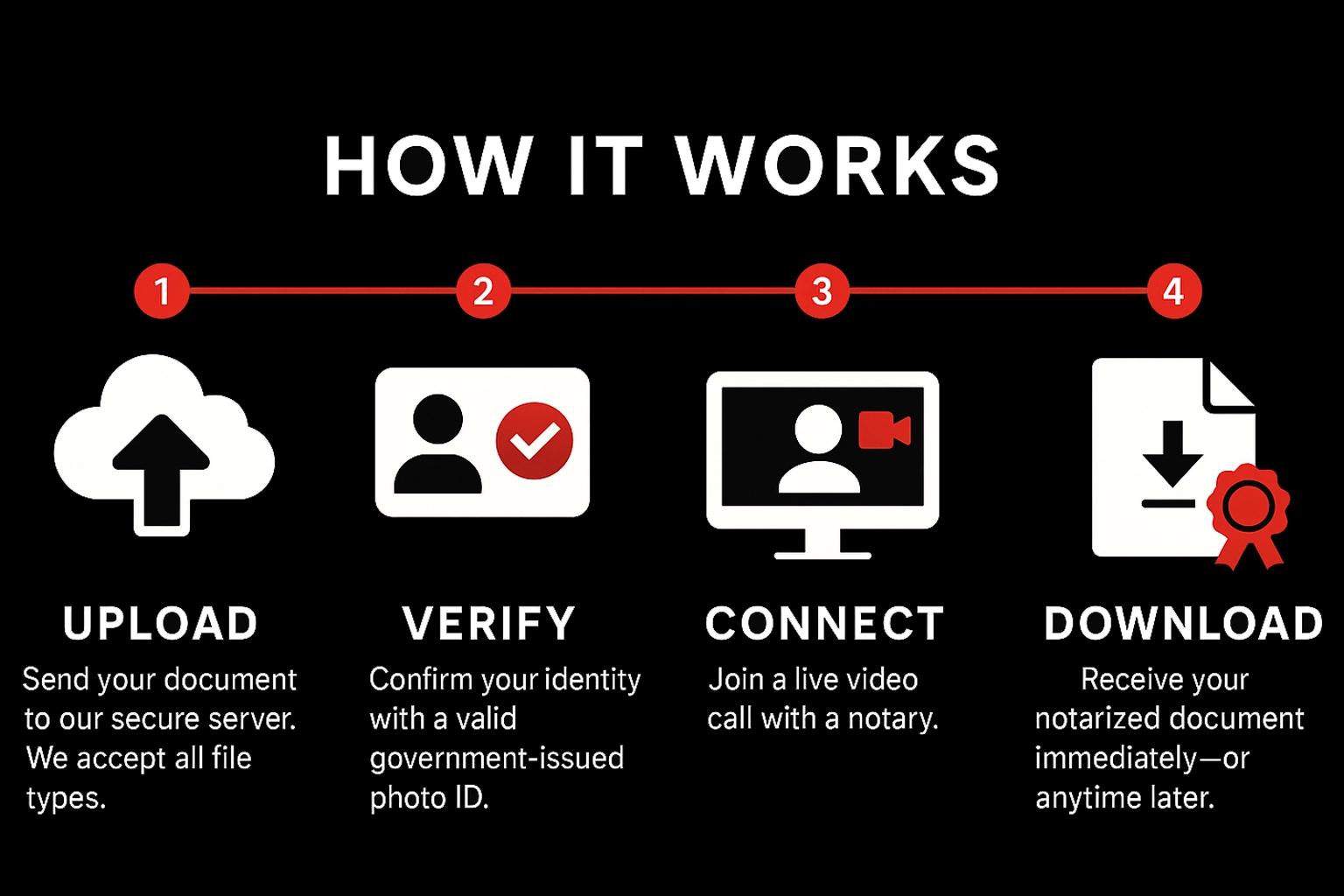
How It Works

Upload

Send your document to our secure server. We accept all file types.

Verify

Confirm your identity with a valid government‑issued photo ID.

Connect

Join a live video call with a notary.

Download

Receive your notarized document immediately—or anytime later.

Pricing & Payment

Standard

$15
Per stamp • Mon–Fri before 5:00 PM EST

After‑Hours / Weekend

$20
Per stamp • Weekdays after 5:00 PM EST & all day Sat/Sun

Payment

Pay during the meeting via Credit Card, Debit Card, Zelle, Cash App, or Venmo. Notarization completes after payment is received.

What You Need

Requirements

  • Stable internet connection
  • Device with camera, microphone, and sound
  • Ability to appear on a live audio‑video call

Accepted IDs (examples)

  • U.S. state‑issued driver’s license or photo ID
  • U.S. passport (book or card)
  • Certificate of U.S. Citizenship / Naturalization
  • Foreign passport
  • Alien Registration Card (with photo)
  • Military ID

Not a complete list. Unsure? Email hello@lookingglassrunners.com.

Ready to notarize?

Have your document signed and notarized within minutes. Getting a document notarized has never been easier.

Notarize now — fast, secure & nationwide Start

Notary Services in Missouri Valley

Professional online and mobile notary services available 24/7